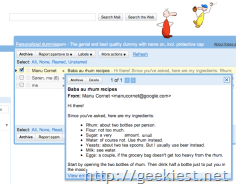
This feature will help you to View a preview of a message with out opening the message. You need just to right click on the message subject from inbox. This will not change the status of the message to read too.
You can Archive, Mark as read, or delete the mail from the sneak peek view.
If you are right clicking on a conversation you can see each one separately using the arrow key in the sneak peak preview
You can also use keyboard shortcuts for a faster sneak-peeking flow (enable keyboard shortcuts in Settings first if you haven't done so): hit 'h' to open a sneak peek card, then navigate with 'j' and 'k,' and dismiss the current card by pressing "Escape." Messages you peak at will stay unread.
To use this, you need to enable this feature, to Enable it
1. Go to the Gmail Labs tab under Settings,
2. Find "Message Sneak Peek"
3. Select Enable
4. Save the settings
Read more here